

Main Facts: The Intersection of Luxury Tech and Productivity
When a tablet approaches a price tag of nearly 4.5 million Colombian pesos, the traditional evaluation matrix must evolve. Consumers can no longer justify the purchase based solely on screen size, weight, or accessory bundles. At this financial tier, a more fundamental, probing question takes center stage: How close is this slate to genuinely replacing the personal computer that professionals, students, and creators still rely on for their daily workflows?
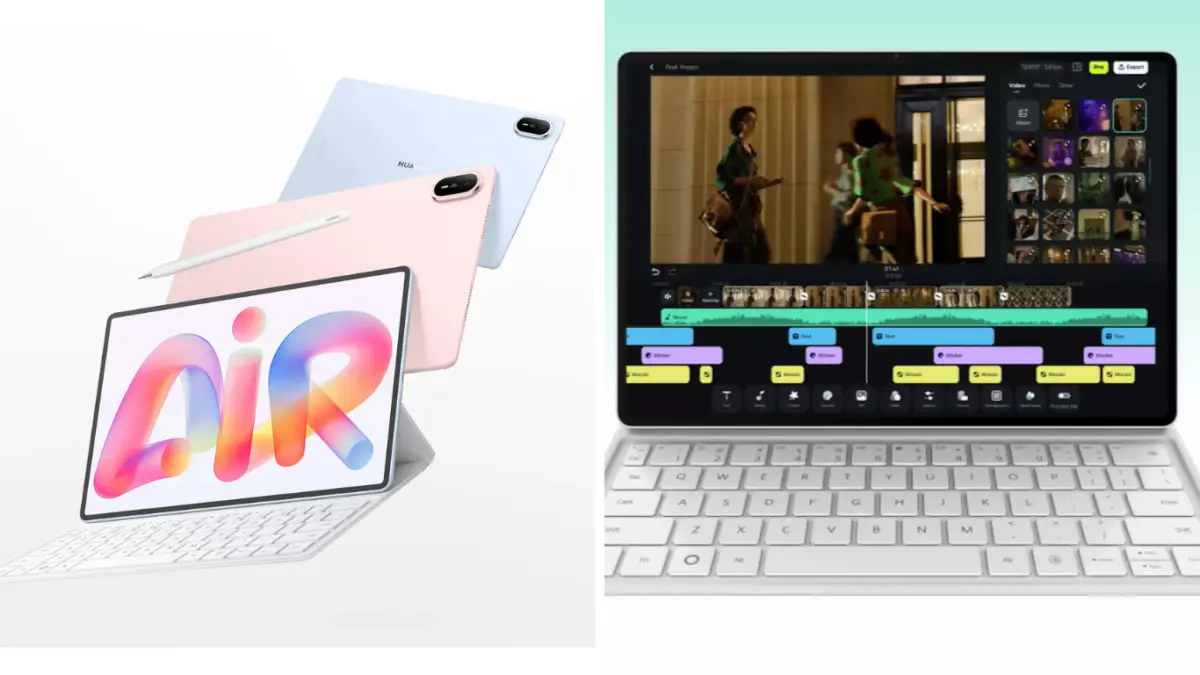
Entering directly into this high-stakes arena is the newly arrived HUAWEI MatePad Air, which officially launches in Colombia. The device starts at $3,899,900 COP, a configuration that thoughtfully includes the HUAWEI M-Pencil Pro, a HUAWEI Wireless Mouse in gray, and a 100W USB-C HUAWEI Power Adapter. However, for users looking for the complete ecosystem setup—which adds a dedicated keyboard folio to the mix—the price climbs to $4,499,900 COP.
This top-tier pricing instantly shifts the consumer conversation. At nearly four and a half million pesos, the MatePad Air ceases to be treated merely as a secondary companion screen or an entertainment consumption tool. Instead, it positions itself as a bold, premium alternative to traditional laptops. This blurs a notoriously fine line that grows harder to define with each hardware generation: At what point is a high-end tablet genuinely "enough," and at what point does a traditional laptop remain an absolute necessity?
Chronology: The Evolution of the Post-PC Era
To understand the weight of the MatePad Air’s arrival in the Colombian market, one must trace the timeline of mobile computing over the past decade and a half.
- The Companion Era (2010–2015): Tablets entered the mainstream market primarily as consumption devices—glass slabs meant for streaming videos, reading digital magazines, and casual web browsing. Typing long documents or running complex spreadsheets on a tablet remained a frustrating, compromised experience.
- The Hybrid Experiment (2016–2020): Manufacturers recognized that raw mobility needed to be paired with productivity features. Detachable keyboards and active styluses began to emerge, slowly transforming tablets into pseudo-laptops. However, software limitations, sluggish processors, and clunky multitasking interfaces held them back from being true primary work machines.
- The AI and Pro-Performance Shift (2021–Present): With the integration of advanced mobile processors, high-refresh-rate OLED displays, and sophisticated artificial intelligence tools (such as WPS Office AI and specialized drawing suites), tablets crossed a threshold. Displays became paper-like, accessories became seamless, and software environments matured. The launch of the MatePad Air in Colombia marks the culmination of this timeline—where mobile hardware is robust enough to challenge traditional laptop dominance, provided the user’s workflow aligns with its capabilities.
Supporting Data: Specifications and Pricing Breakdown
For a device commanding such a significant investment, the hardware specifications must justify the cost. The HUAWEI MatePad Air brings a compelling array of physical and technical metrics to the table:
- Pricing Structure:
- Base Package (Includes MatePad Air, HUAWEI M-Pencil Pro, HUAWEI Wireless Mouse, and 100W Power Adapter): $3,899,900 COP
- Full Ecosystem Package (Adds the dedicated keyboard folio): $4,499,900 COP
- Physical Dimensions & Build:
- Weight: 509 grams
- Thickness: 5.3 millimeters
- Display Technology:
- Panel Type: OLED PaperMatte
- Size: 12 inches
- Resolution: 2,800 x 1,840 pixels
- Peak Brightness: 1,200 nits
- Refresh Rate: 144 Hz
- Battery & Connectivity:
- Local Video Playback: Up to 16 hours
- Online HDR Video Streaming: Up to 10 hours
- Wireless Standard: Wi-Fi 7
These numbers indicate that Huawei has engineered the MatePad Air not just for visual fidelity, but for sustained mobile productivity. The OLED PaperMatte display, in particular, is designed to drastically reduce glare and eye strain for users who spend hours reading, annotating, or drafting documents, separating it from standard glossy tablet screens found in lower-tier devices.
Official Perspectives and Ecosystem Integration
Huawei’s product strategy for the MatePad Air centers heavily on bridging the gap between hardware mobility and software capability. According to regional product positioning, the device is built to handle heavy administrative and creative workloads without forcing the user to lug around a heavier clamshell laptop.
The Keyboard and WPS Office AI
When coupled with its physical keyboard, the MatePad Air transitions smoothly into a desktop-like configuration. Huawei has integrated deep support for WPS Office AI, allowing users to draft documents, manipulate spreadsheets, build dynamic presentations, and analyze PDFs with intelligent assistance. The suite includes advanced utilities capable of converting voice-to-text seamlessly and generating entire presentation structures from a single conceptual prompt.
The Creative Edge: M-Pencil Pro and GoPaint
The inclusion of the HUAWEI M-Pencil Pro elevates the device beyond simple text-entry tasks. The stylus is engineered with advanced touch and gesture controls, allowing users to flip pages in digital documents without making physical contact with the glass, or utilize an "air mouse" mode to command slide decks during live presentations.
For visual creators, the integration of GoPaint transforms the 12-inch canvas into a responsive digital studio. Artists and designers can sketch, paint, and edit directly on the OLED PaperMatte surface, leveraging the 144 Hz refresh rate for ultra-low latency input.
Implications: The Core Decision Facing Colombian Consumers
The release of a 4.5-million-peso tablet forces buyers to re-evaluate their relationship with technology. The dilemma is no longer about whether a tablet can mimic a computer, but rather about matching the tool precisely to the user’s day-to-day realities.
When the Tablet Wins
For professionals, students, and digital creators whose workflows revolve around cloud applications, document editing, web research, virtual meetings, note-taking, reading, and digital art, the MatePad Air presents a triumphant alternative. Carrying a 12-inch workstation that weighs a mere 509 grams—while offering up to 16 hours of battery life and Wi-Fi 7 connectivity—offers a profound ergonomic advantage over hauling a traditional laptop and its charging brick.
Where the Traditional PC Holds the Line
Conversely, complications arise the moment a workflow depends on legacy desktop software, specialized local drivers, or intensive multi-monitor development environments. Simply attaching a keyboard, mouse, and a large screen to a tablet does not automatically convert its underlying operating system into a desktop PC. Users must rigorously audit the specific applications they require every day before committing to a tablet-first lifestyle.
The Ultimate Frontier
Ultimately, the barrier dividing modern technology consumers is no longer drawn strictly between tablets and laptops. Instead, the true frontier lies between the specific tasks a user needs to accomplish and the hardware ecosystem that removes the most friction from that process.
At nearly $4.5 million COP, the HUAWEI MatePad Air is a formidable piece of engineering that proves mobile slates can step out of the shadow of the personal computer. Whether it replaces your laptop depends entirely on whether your work lives in the cloud and on the page, or deep within the confines of traditional desktop architecture.


Leave a Reply