

By Tech & Innovation Desk
Updated October 2023
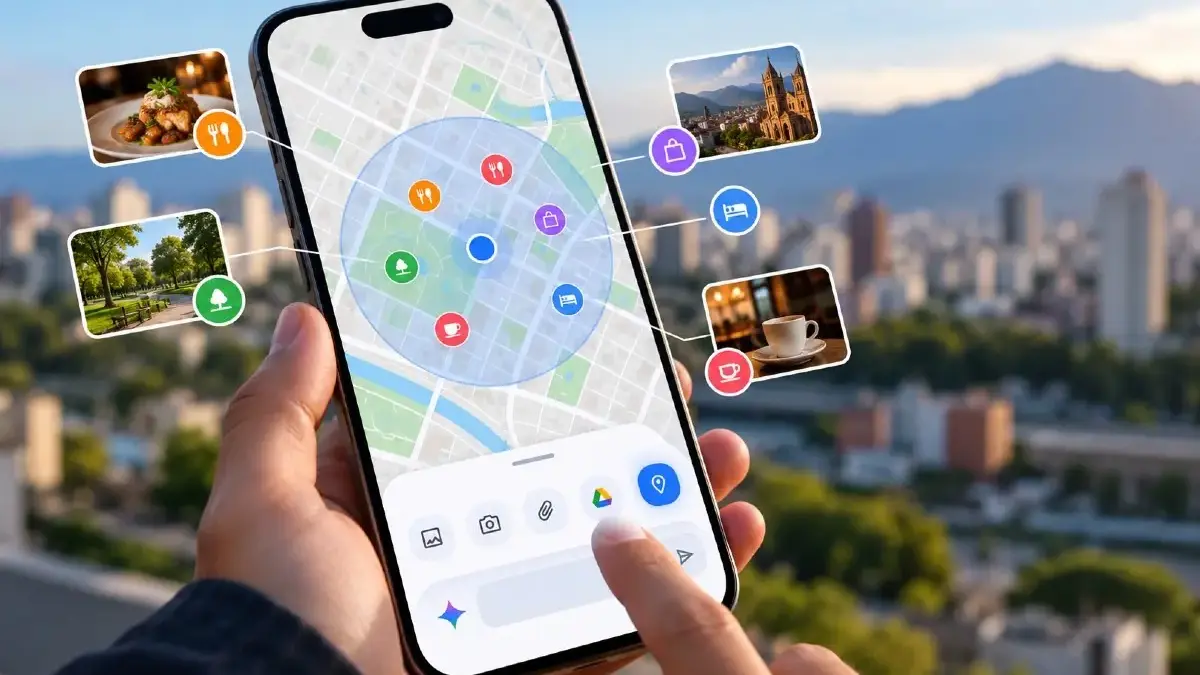
Finding where to eat, deciding what to do in an unfamiliar neighborhood, or discovering hidden gems around a specific landmark has traditionally required precise textual descriptions or relying strictly on a device’s current GPS coordinates. However, a major new update is fundamentally reshaping how users interact with location-based queries. Google is rolling out an interactive map feature directly within its Gemini artificial intelligence assistant, allowing users to select a specific geographic sector on a visual interface and use it as an immediate reference point for localized recommendations.
This new functionality integrates the geographic component right at the onset of a conversation. Instead of typing out complex street addresses, cross-streets, or struggling to describe a particular area, users can simply point to a region of interest on an interactive map and complete their prompt. The AI receives an immediate visual reference, narrowing its focus to the exact perimeter defined by the user.
According to reports from industry trackers like Android Authority, this capability is steadily making its way to both Android and iOS platforms via the mobile app, though availability may vary globally as Google executes its phased rollout.
1. Main Facts: How the New Gemini Map Feature Works
The core of this new feature lies in shifting the burden of location identification from text-based descriptions to a visual, interactive selection process.
Within the Gemini mobile app, the tool appears simply as "Map" nested inside the carousel of accessory options. It sits comfortably alongside familiar shortcuts like Photos, Camera, Files, Google Drive, and Notebooks.
The User Experience: Step-by-Step
- Accessing the Tool: When a user taps the "Map" option within the Gemini app interface, an interactive map view opens on the screen.
- Defining the Perimeter: A clear, circular boundary highlights the area of initial interest. Users can pinch to zoom in or out, pan across neighboring districts, or type a landmark into the integrated search bar to quickly jump to a new region. This design entirely bypasses the need for a formal, written address when the primary goal is generalized regional exploration.
- The "Explore This Area" Command: Once the target sector is framed correctly, a prompt option labeled "Explore this area" appears. Tapping this embeds a "Map Area" tag directly into the user’s text prompt.
- Formulating the Prompt: With the zone locked in, the user can type or dictate their request—such as asking for quiet cafes, family-friendly parks, boutique shopping, or specific dining options—knowing the AI is analyzing parameters strictly within that designated perimeter.
This capability proves exceptionally useful when travelers or locals are unfamiliar with exact neighborhood names, when exploring sprawling districts across multiple city blocks, or when planning itineraries around hotels, transit stations, and commercial zones.
2. Chronology of Spatial AI: From GPS Blue Dots to Bounding Boxes
The evolution of location-aware artificial intelligence has been marked by a gradual fusion of cartography and natural language processing.
- Early Location Awareness (Pre-2023): Initially, digital assistants relied almost entirely on device-level GPS coordinates. If a user asked, "Where is the nearest coffee shop?", the system pulled latitude and longitude data to scan a rigid radius (e.g., 1 mile) from the physical phone. This method failed when planning trips ahead of time or researching unfamiliar cities.
- The Integration of Google Maps Data: Google subsequently bridged its vast knowledge graph with Gemini, allowing the AI to pull public data from Google Maps—including business hours, user reviews, star ratings, official websites, and basic directions. However, users were still constrained by how they phrased their queries; searching for options in a future destination required cumbersome descriptions like "Find Italian restaurants near the corner of 5th and Main in downtown Chicago."
- The Current Leap (Late 2023/2024): The introduction of the interactive "Map" tool marks the transition from text-inferred geography to explicit visual framing. By allowing users to draw or center a bounding box/circle before chatting, Google has closed the gap between vector-based mapping and conversational intent.
While Google has not yet published an exhaustive roadmap detailing every regional or linguistic rollout phase, industry observers note that the feature is being deployed iteratively through server-side updates, ensuring system stability across diverse operating systems.
3. Supporting Data and Ecosystem Integration
To fully understand the weight of this update, it is necessary to examine how Gemini interacts with Google’s broader ecosystem—specifically Google Maps—and where the boundaries between the two applications lie.
What Gemini Leverages from Google Maps
According to official Google documentation, Gemini’s map integration taps directly into public Google Maps data repositories. This grants the AI access to:
- Commercial Metadata: Direct access to business listings, categories, and operational hours.
- Social Proof: Aggregated user reviews, ratings, and popular times.
- External Links: Direct web addresses and deep links that can transfer users seamlessly into the standalone Google Maps application for turn-by-turn guidance.
Comparative Feature Analysis: Gemini Map vs. Google Maps
| Feature / Capability | Gemini "Map" Tool | Google Maps App |
|---|---|---|
| Primary Focus | Conversational discovery, brainstorming, and localized recommendations. | Precision navigation, routing, and transit planning. |
| Area Selection | Interactive visual circles/bounding boxes chosen prior to prompting. | Dynamic panning based on GPS, saved pins, and search queries. |
| Real-Time Traffic | ❌ Not supported | ✅ Fully integrated with live updates |
| User Contributions | ❌ Cannot add reviews, photos, or edit data | ✅ Full suite for local guides and community edits |
| Saved Places / Lists | ❌ Does not sync account-saved custom lists | ✅ Full synchronization with "Saved Places" and labels |
As highlighted by the data above, Gemini’s mapping tool is explicitly designed as a discovery engine, not a navigation utility. It helps users decide what to do and where to go, while handing off the actual transit logistics to Google Maps.
4. Official Responses and Technical Limitations
Google’s engineering and documentation teams have been transparent about the boundaries of the new tool. Rather than positioning Gemini as a replacement for its flagship navigation app, the company frames the AI feature as a complementary layer.
Clarifying the Scope
In official support disclosures, Google emphasizes that the integration does not inherit every single feature of the Google Maps ecosystem. Specifically:
- No Real-Time Telemetry: Commuters cannot ask Gemini for live traffic updates, accident reports, or alternate driving routes to bypass congestion. For these tasks, the user is still directed back to Google Maps or Waze.
- Absence of Personalization Caching: The tool currently operates on public map data and the immediate visual prompt; it does not inherently cross-reference a user’s deeply customized "Labeled Places" (like "Home" or "Work") or personal saved lists unless explicitly stated in text.
- Phased Deployment Caveats: Because the feature relies on server-side activation tied to app version updates, users across different regions may experience staggered rollouts. Google has noted that language support and account-type availability (such as Workspace vs. personal consumer accounts) will expand progressively.
5. Implications: Redefining Digital Discovery and the Future of Search
The integration of an interactive map directly into a conversational AI interface carries profound implications for the future of digital search, travel planning, and local commerce.
1. The Death of the "Keyword-Plus-Location" Paradigm
For decades, search engines trained users to think in fragments: "Restaurants in Palermo Soho" or "Museums near Ueno Station." This forced users to know proper nomenclature beforehand. By decoupling discovery from exact naming conventions, Gemini’s visual map tool democratizes local exploration. A user can blindly scroll across an unfamiliar map of a coastal town, circle a random harbor, and ask: "Where can I buy fresh seafood here?" The cognitive load of searching is drastically reduced.
2. Redefining the Line Between Search and Navigation
Tech giants are racing to figure out where "finding information" ends and "taking action" begins. Google is uniquely positioned here because it owns both the world’s most popular search/AI stack (Gemini) and the world’s most dominant mapping infrastructure (Google Maps). By keeping Gemini conversational while tethering it to Maps data, Google creates a unified funnel:
- Inspiration: User circles a zone in Gemini.
- Decision: Gemini recommends a specific bistro based on user reviews.
- Execution: User taps the result to open Google Maps for walking directions.
This seamless handoff keeps users within Google’s ecosystem while assigning specialized roles to each app.
3. Impact on Local Businesses and Small Enterprises
As AI-driven discovery becomes more spatial and conversational, local business optimization (Local SEO) will evolve. When Gemini synthesizes data for a selected map area, it relies heavily on accurate business descriptions, categories, and positive sentiment within Google Maps reviews. Businesses that maintain up-to-date profiles with rich descriptive tags will be better positioned to be recommended when an AI scans a user-defined geographic boundary.
Looking Ahead
As multimodal artificial intelligence continues to mature, text prompts alone are proving insufficient for understanding complex human intent. Geography is inherently visual and spatial. By giving Gemini a pair of "eyes" to look at a map alongside the user, Google has taken a crucial step toward making artificial intelligence feel less like a remote chatbot and more like a local guide standing right beside you, pointing at a map and saying: "Let’s explore right here."



Leave a Reply