

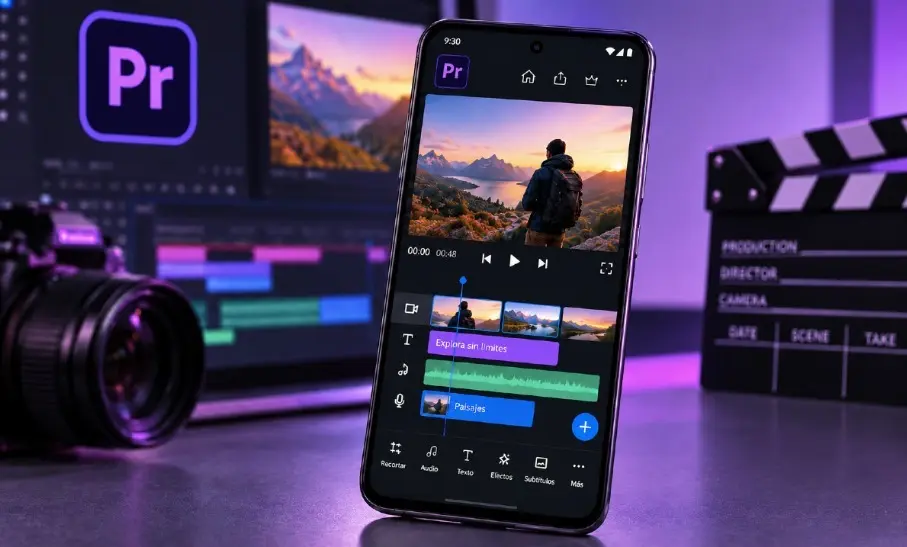
Global Technology Desk — The landscape of mobile content creation has shifted dramatically as Adobe officially launches its flagship video editing application, Adobe Premiere, for Android devices. Following its successful debut on Apple’s iOS platform, the professional-grade video editor is now accessible to millions of Android users worldwide.
Crucially, the application arrives as a free download that does not require a paid Creative Cloud subscription to access core professional tools. Content creators can now edit multi-track video, mix audio, integrate dynamic text, apply advanced visual effects, and export projects in breathtaking 4K resolution directly from their smartphones and tablets.
This long-awaited release closes a significant chapter for mobile creators and cements Adobe’s commitment to democratizing high-end video production tools. However, while the baseline editing suite is free of charge, subscriptions and credits remain tied to advanced artificial intelligence (AI) integrations and cloud storage expansions.
Main Facts: What Adobe Premiere for Android Offers
The arrival of Premiere on Android is not merely a port of an older mobile application; it represents a modern, redesigned editing ecosystem tailored for handheld hardware.
At the core of the application is a robust multi-track timeline. Unlike traditional mobile editors that limit users to a single video track and a single audio track, Adobe’s solution allows creators to independently organize video clips, background music, voiceover recordings, text overlays, and visual effects within a single project. This granular control transforms the smartphone into a legitimate mobile post-production suite.
Key features included in the free tier of the application feature:
- Frame-Accurate Trimming: Users can make precise cuts to determine the exact entry and exit points of individual takes.
- Extensive Creative Resources: Access to pre-built templates, dynamic transitions, and standard visual effects to accelerate the editing workflow.
- Integrated Audio Suite: Creators can import personal audio files, extract sound from existing video content, or source royalty-free music directly from Adobe Stock.
- Voiceover Recording: Built-in tools allow direct voice recording and sound manipulation within the app environment.
- Enhance Audio: A powerful AI-driven feature designed to strip away background noise and drastically improve vocal clarity—ideal for on-the-street interviews, vlogs, and outdoor mobile journalism.
- Watermark-Free 4K Export: Finished projects can be rendered and exported up to 4K resolution without any imposed company watermarks or artificial export caps.
Despite these powerful features, the application is not an exact one-to-one replica of the desktop software. Adobe has confirmed that several advanced tools—such as integration with Adobe Fonts, enhanced subtitle generation, advanced keyframing, and automatic beat-detection—are slated for upcoming software updates. Furthermore, future iterations will introduce seamless cloud handoff, allowing editors to initiate a timeline on their Android smartphone and seamlessly finish the project on desktop Premiere Pro.
Chronology: The Road to Android
The journey to bring Adobe Premiere to Android has been a patient and calculated evolution for the software giant.
- The Era of Premiere Rush: For years, Adobe’s primary mobile offering was Premiere Rush, a streamlined, simplified video editor designed for quick social media uploads. While functional, Rush lacked the deep architectural flexibility, multi-track power, and professional capabilities demanded by modern digital creators.
- Late 2025 (The Announcement): Adobe officially confirmed that it was discontinuing active development and support for Premiere Rush while simultaneously building a completely new, next-generation mobile version of Premiere. While the iOS version rolled out shortly after this restructuring, Android users faced an extended waiting period as engineers optimized the software for a highly fragmented hardware ecosystem.
- Early 2026 (The iOS Rollout): Adobe launched the overhauled Premiere app on the Apple App Store. The freemium model—free core editing coupled with paid AI credits—proved successful, establishing a roadmap for the subsequent Android release.
- Present Day (The Android Launch): Adobe officially drops the Android version, fulfilling its promise to bridge the platform gap. The release aligns with broader industry trends toward powerful mobile-first productivity suites, matching the capabilities of hardware that now boasts multi-core mobile processors and robust graphics engines.
Supporting Data and Technical Requirements
While the software is free to download, running professional-grade video editing software on a smartphone requires significant hardware muscle. Adobe has established strict baseline system requirements to ensure stable performance.
Hardware Prerequisites
- Operating System: Android 13 or higher is strictly required to run the application. Devices operating on older Android iterations are incompatible, regardless of raw processing power.
- Memory (RAM): A minimum of 5 GB of RAM is mandatory.
- Form Factor Optimization: The user interface has been engineered to scale dynamically across diverse screen layouts, including standard slab smartphones and complex foldable devices.
Industry analysts note that meeting these minimum requirements does not guarantee an identical user experience across all devices. Rendering heavy 4K timelines with multiple video layers, color grading filters, and audio enhancements places a heavy load on a mobile processor (SoC) and thermal management systems. Mid-range devices may experience frame drops or longer export times compared to high-end flagship smartphones equipped with modern neural processing units (NPUs).
Official Responses and Monetization Strategy
Adobe’s monetization strategy for mobile Premiere walks a careful line between accessibility and enterprise revenue generation. By making the foundational multi-track editor and 4K exporting entirely free—with zero advertisements and zero watermarks—Adobe lowers the barrier to entry for aspiring filmmakers, content creators, and students.
However, advanced features tied to Adobe Firefly, the company’s proprietary generative AI model, operate on a consumption-based credit system.
The Economics of Adobe Firefly on Mobile
- Generative Capabilities: Users can prompt the AI to generate custom background video B-roll, visual effects, and sound effects simply by typing text descriptions. Creators can also upload reference images to guide the AI in producing style-matched video assets.
- The Credit System: Accounts are allotted a baseline pool of generative credits. Basic operations consume these credits. Once the complimentary monthly allowance is exhausted, users must purchase supplemental credit packs.
- Cloud Storage: Extended cloud storage for cross-device projects may also require a paid upgrade, though local device storage remains entirely free to utilize.
Adobe representatives emphasize that users who only require traditional editing techniques—cutting, audio cleaning, text overlay, and multi-track arranging—can utilize the application indefinitely without entering a subscription funnel. The payment structure is strictly optimized for those leaning heavily into generative AI workflows or ecosystem synchronization.
Implications for the Mobile Content Creation Market
The arrival of Adobe Premiere on Android is poised to disrupt the mobile video editing market significantly. For years, Android creators relied on third-party applications like CapCut, LumaFusion (recently expanded), or Kinemaster to achieve professional-level results on the go.
By introducing an industry-standard name backed by powerful local processing and optional AI generation, Adobe is challenging competitors directly.
- Democratization of 4K Production: High-end workflows—once confined to desktop computers suites costing thousands of dollars—are now available in the pocket of anyone with a compatible mid-to-high-tier Android phone.
- Workflow Mobility: The upcoming desktop continuity feature means journalists, travel vloggers, and independent filmmakers can shoot on mobile, rough-cut on a tablet during a flight, and execute final color grading and audio mastering on a workstation.
- The AI Arms Race: By integrating Adobe Firefly directly into a mobile timeline, Adobe has raised the expectation for what pocket-sized software can achieve, pushing artificial intelligence from a desktop novelty to an everyday mobile utility.
As mobile hardware continues to close the performance gap with traditional desktop computers, Adobe’s strategic expansion into Android ensures that Premiere remains at the absolute forefront of modern digital storytelling.


Leave a Reply